


Voice Tools
4.3430.00 Reviews
App Specs
- Version
- 2.0.177
- Updated On
- License
- Free
- Downloads
- 500,000+
- Developer
- DevExtras
- Categories
- Medical
- Platform
- Android, iOS
Screenshots
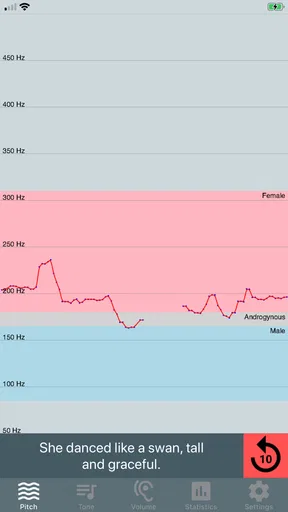
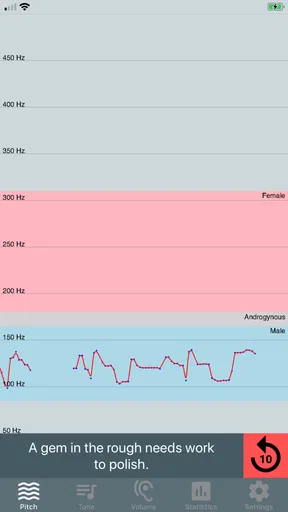
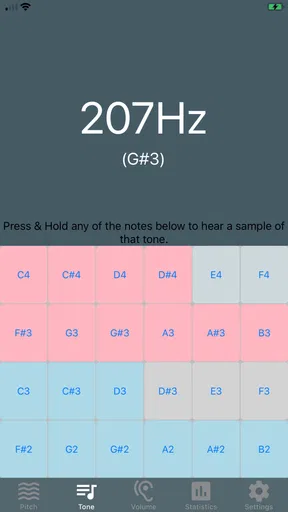
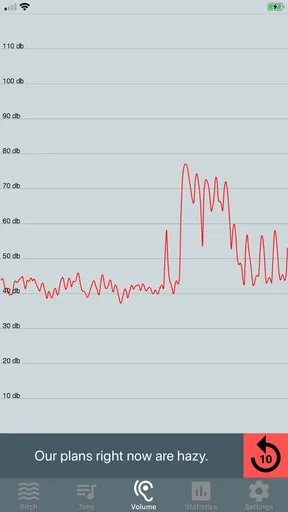
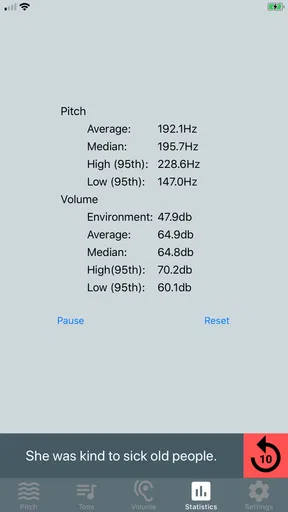
 Analysis by AppCompare
Voice work can feel awkward when I do not know what to listen for: a sentence may sound clear to me while its pitch, tone, or loudness is not quite what I intended. Voice Tools is best understood as a practical place to observe those parts of speech while working on voice therapy, rather than as a general-purpose recording studio. Its medical focus makes it most useful when I have a particular vocal habit or exercise in mind and want a simple way to pay attention as I speak.
What to expect from a voice analyser
The central idea is to look at your voice in real time, not merely save audio and listen back later. That distinction matters: playback can help you judge whether you like a recording, but live feedback can make it easier to notice changes while you are speaking. I would approach the app as a companion to deliberate practice, not as a clinician or a substitute for professional advice.
Voice Tools comes from DevExtras and is a free medical app, with in-app purchases listed at $19.99 per item. It has an average rating of 4.4 from around 3,100 ratings and more than 500,000 installs. Those figures suggest that it has found an audience, but they do not tell me whether its approach suits every voice or therapy goal. It is rated for Everyone, and its current version is 2.0.173.
Starting without overthinking the setup
My advice to a first-time user is to begin somewhere quiet, hold the phone at a comfortable distance, and speak in a natural voice. Give the microphone access the app needs to hear you, then try a short, ordinary phrase before attempting a long reading. A familiar sentence is a better baseline than a dramatic performance because you can repeat it later under similar conditions.
Keep the surroundings and speaking distance as consistent as you can when comparing attempts. A fan, television, or nearby conversation can affect what the microphone picks up, and moving the phone between takes can make differences seem larger or smaller than they really are. If the first display is confusing, slow down and change one thing at a time: speak a little more softly, pause, then try again. That makes the feedback easier to interpret than changing pitch, volume, speed, and distance all at once.
Your first useful practice session
A realistic first session could be a few minutes before a presentation, phone call, or class. I would choose a short sentence I expect to say, speak it comfortably, and observe the pitch, tone, and volume feedback without trying to force a particular result. Then I would repeat the sentence once with one small adjustment. The point is not to chase a perfect-looking display; it is to connect what I hear and feel with the way the app responds.
That approach is especially helpful for someone who is learning to notice vocal patterns. A language learner, for instance, can use a short phrase as a repeatable exercise, while someone preparing to speak in a meeting can check whether their voice feels controlled rather than strained. If you are working through a therapy plan, use the exercises and targets given by your clinician; the app can support practice, but it cannot decide what is appropriate for you.
Worth Reading Before You Choose

EA SPORTS FC Mobile 26 Is a Bigger Football Game, but It Takes Time

Flipboard Shows What News Apps Must Do Beyond the Feed

Switching to Android Auto Means Rethinking Your Driving Routine

Google Calendar Makes a Crowded Week Easier to Manage

Ludo King Makes the Most of the Minutes Between Plans

Baby Panda World Brings Quick Play to Modern Phones, but Its Game Library Feels Busy
Using the app with realistic expectations
I’d use this section to set a sensible goal before opening the analyser: decide whether I’m practising pitch, tone, or volume, rather than trying to improve everything at once. That small choice makes the first session easier to interpret and keeps the app’s feedback in perspective. From there, I can build a repeatable routine that feels useful without turning each reading into a pass-or-fail test.
Where it fits—and where it does not
Voice Tools is a better fit for focused voice observation than for editing a finished podcast, mixing music, or building a polished audio project. Those jobs usually call for a recording editor with detailed trimming, tracks, and export controls. Likewise, a basic recorder is often the quicker choice if all I need is to capture a reminder. This app’s distinct value is the attention it gives to live vocal qualities, so it makes most sense when I want to practise rather than simply save sound.
It is also not the right tool for diagnosing a voice problem. A live analyser can offer useful feedback, but microphone placement, room noise, and the way a person speaks all affect what a phone captures. I would not treat a reading as a medical conclusion or push my voice to hit a value. If speaking causes pain, unusual strain, or ongoing concern, a qualified professional is the right person to consult.
Small habits that make feedback more useful
One non-obvious trade-off is that a quiet room makes practice easier to interpret, but it may not resemble the place where you actually need to speak. I would first practise in a calm setting to learn how the feedback behaves, then try a realistic environment only if that is relevant to the goal. Do not compare a quiet-room attempt directly with one made beside traffic as though the difference must come from your voice.
Another useful habit is to keep practice brief and repeatable. Pick one sentence, use roughly the same distance from the phone, and focus on one quality at a time. This gives you a more meaningful comparison than a long, varied monologue. If you are checking loudness, for example, avoid simultaneously whispering, changing rooms, and turning away from the microphone; each change makes it harder to understand what caused the display to shift.
Common points of confusion
Real-time feedback can look more precise than it is. I would read it as a guide to what the phone is detecting, not as a score of how good or healthy my voice is. A different room or speaking distance may change the result, and an expressive sentence naturally varies from one moment to the next. For a steadier comparison, repeat the same short phrase under similar conditions instead of expecting every part of everyday speech to remain constant.
It is also worth separating the app’s medical purpose from the broader ways people may enjoy experimenting with audio. If your goal is voice therapy, keep the session practical and follow professional guidance. If you want elaborate effects, detailed edits, or a reliable archive of long recordings, a dedicated audio tool is likely a better match. I would not install a voice analyser expecting it to replace those separate tools.
Who is likely to get the most from it?
I would recommend it to a first-time user who wants to pay closer attention to speech and is comfortable practising in short, purposeful sessions. It may also suit a person following voice exercises who wants a convenient way to observe their own speaking, provided they understand that an app cannot replace a therapist. Students and people preparing for presentations may appreciate the chance to rehearse a sentence and listen more carefully to how they deliver it.
On the other hand, someone who only needs quick voice memos may find a standard recorder less distracting. A creator who needs multitrack editing or production controls should choose an audio editor, while anyone expecting a medical diagnosis should speak with a professional instead. Choosing the right alternative depends on the task: Voice Tools makes most sense when the task is awareness and practice, not recording management or clinical assessment.
A measured recommendation
Voice Tools is a focused option for anyone who wants to make voice practice more attentive, and the free starting point makes it easy to see whether that approach suits you. Its strongest use is a short, repeatable exercise: settle into a consistent setup, speak naturally, and treat the live response as a prompt to observe rather than a verdict. That is a more reassuring way to begin than trying to master every control or judge your voice after a single attempt.
There are limits to keep in mind. It cannot tell you what vocal target is medically right for you, and phone-based feedback is affected by the conditions around each session. Still, if you want a simple way to focus on pitch, tone, and volume while practising, I think it is worth trying. Start with one familiar phrase, make one small adjustment, and decide from that first useful session whether the feedback helps you speak with more awareness.
Have you ever imagined having a personal assistant right in your pocket, ready to transform your voice into a powerful tool for endless possibilities? Well, that's what Voice Tools promises to deliver, and I must say, it pretty much lives up to the hype. After tinkering around with this app on my phone, I’m here to spill the beans on what you can expect from this nifty little piece of tech.
Getting Started with Voice Tools
First things first, downloading Voice Tools is a breeze. Whether you’re on Android or iOS, a quick search in the app store, a couple of taps, and you're good to go. The initial setup is intuitive, guiding you through basic permissions like microphone access—an obvious must-have for a voice app. Once you’re in, the interface is clean and clutter-free, making navigation easy even for those who aren’t particularly tech-savvy.
Exploring the Features
This app is packed with features that cater to a variety of needs. Whether you’re looking to practice public speaking, play around with voice effects, or simply record notes, Voice Tools has got you covered. Here are a few highlights:
- Voice Modulation: Transform your voice with a range of effects. Want to sound like a robot or an alien? It’s all possible with a few taps.
- Speech Practice: This is a gem for those who want to work on their public speaking skills. Practice your speech, get feedback, and improve your delivery.
- Recording Capabilities: Need to quickly jot down a thought or an idea? The recording feature is straightforward and effective.
- Background Noise Reduction: A handy feature for ensuring your recordings are crisp and clear, even in less-than-ideal environments.
User Experience
Now, let’s talk about the user experience. One of the things I love about Voice Tools is its simplicity. The app doesn’t bombard you with ads or unnecessary prompts. It’s just you and your voice. The voice modulation feature is particularly fun, and I spent a good chunk of time just playing around, trying out different settings. It’s also quite reliable; I didn’t experience any crashes or glitches, which is always a plus in my book.
However, if I’m being honest, there were a couple of instances where the app lagged a bit, particularly when trying to process longer recordings. It’s not a deal-breaker, but something to keep in mind if you’re planning to use it extensively.
Who Will Love This App?
So, who exactly is Voice Tools for? In my opinion, it's perfect for anyone looking to explore the power of their voice. Whether you're a content creator, a student, or someone who just loves experimenting with audio, this app offers something valuable. It’s also a great tool for language learners who want to practice pronunciation and fluency.
Parents might find it useful for engaging kids with its fun voice effects, while professionals can use it to hone their speaking skills. The versatility of this app is truly impressive.
Final Thoughts
All in all, Voice Tools is a delightful app that brings the magic of voice manipulation to your fingertips. It’s easy to use, feature-rich, and most importantly, fun. While there are minor hiccups here and there, the overall experience is smooth and rewarding. If you’ve been on the lookout for a voice app that does a little bit of everything, give Voice Tools a whirl. You might just find it becoming a staple in your app repertoire.
Pros
- User-friendly interface and navigation.
- High-quality voice effects and filters.
- Real-time voice modulation available.
- Supports multiple audio formats.
- Regular updates with new features.
Cons
- Some features require in-app purchases.
- Occasional minor bugs in recording.
- Limited free trial for premium features.
- Requires internet for some functionalities.
- Ads can be intrusive at times.
FAQs for Voice Tools
What is Voice Tools and what features does it offer?
Voice Tools is a versatile app designed for voice manipulation and improvement. It includes features like voice modulation, pitch adjustment, and sound effects. Users can also enjoy real-time voice change during calls, audio recording, and playback options. This makes it ideal for content creators, gamers, and those looking to enhance their voice interactions.
Is Voice Tools available on both Android and iOS platforms?
Yes, Voice Tools is available for download on both Android and iOS platforms. Users can find the app on the Google Play Store for Android devices and the Apple App Store for iOS devices. The app maintains a similar interface across both platforms, ensuring a consistent user experience.
Does Voice Tools offer any in-app purchases or subscriptions?
Voice Tools offers a range of features for free, but it also includes in-app purchases for advanced functionalities. Users can opt for premium upgrades to access additional effects and tools. Subscription options may be available for users who wish to unlock all features without limitations.
Is the app user-friendly for beginners?
Voice Tools is designed with an intuitive interface that makes it user-friendly, even for beginners. The app provides clear instructions and tutorials to help new users navigate its features effortlessly. Whether you're adjusting your voice or applying effects, the app simplifies the process for everyone.
How secure is my data when using Voice Tools?
Voice Tools prioritizes user privacy and data security. The app requires minimal permissions and ensures that recordings and data are stored locally on your device. Users should review the app’s privacy policy to understand how their data is handled and to ensure they are comfortable with the app’s practices.


